


B2B lead generation and cold email, in one platform
Find companies with AI research agents, verify every address before you send, and run tracked campaigns from your own email accounts. Keep every lead and deal in a built-in CRM.
- AI research on Google and LinkedIn
- Email verification before you send
- Campaigns with open tracking
- Built-in CRM and pipelines
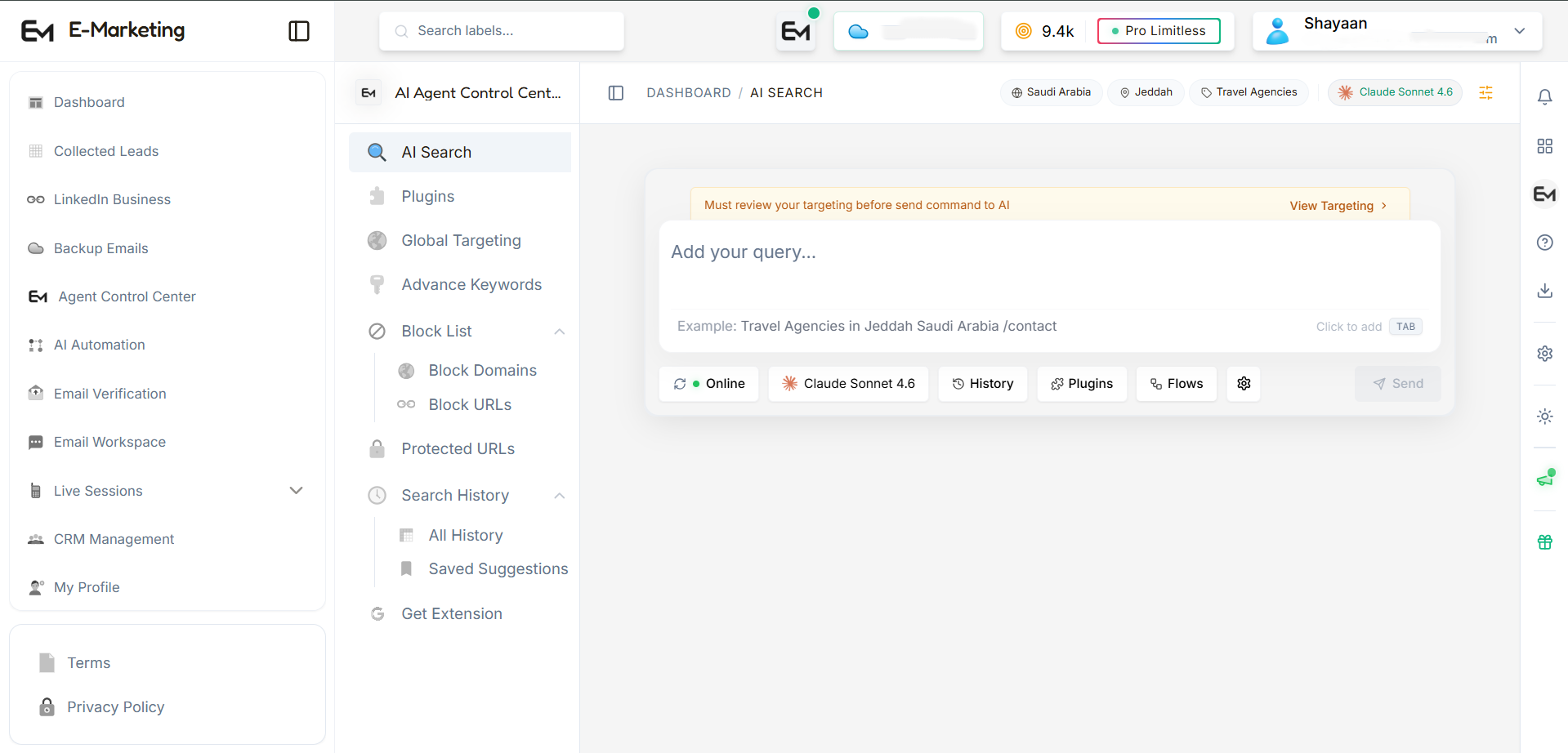
Let AI agents do the lead research
Two research flows collect prospects for you. Every lead lands in your account, ready to verify, export or email.


Find businesses on Google
Tell the agent a category and a location. It searches Google, opens each company website and collects the contact details it finds, so you get a fresh prospect list without copying anything by hand.
Open Prospector AI

Reach decision-makers on LinkedIn
Find companies and the people who run them by role and seniority, then add them to your lead list. Business and Strategist plans add the Claude Sonnet model alongside Gemini.
Open Prospector AIGet your first leads in 3 steps
Three steps from a search to your first email. You do not need any technical knowledge.
Install the extension
Add E Marketing AI from the Chrome Web Store. Then click the puzzle icon in Chrome and pin it, so it stays in your toolbar.
Sign in and search
Open the extension and sign in with your account. Choose what to find, for example "dentists in Dubai". It opens the business websites in the results and saves the contact details it finds.
Check and email your leads
Your leads appear in Collected Leads on the dashboard. Run email verification to remove bad addresses, then send your campaign from your Email Workspace.
Help when you need it
Send a message to our team from the support page or open a ticket from your dashboard. Strategist plan customers also get priority support.
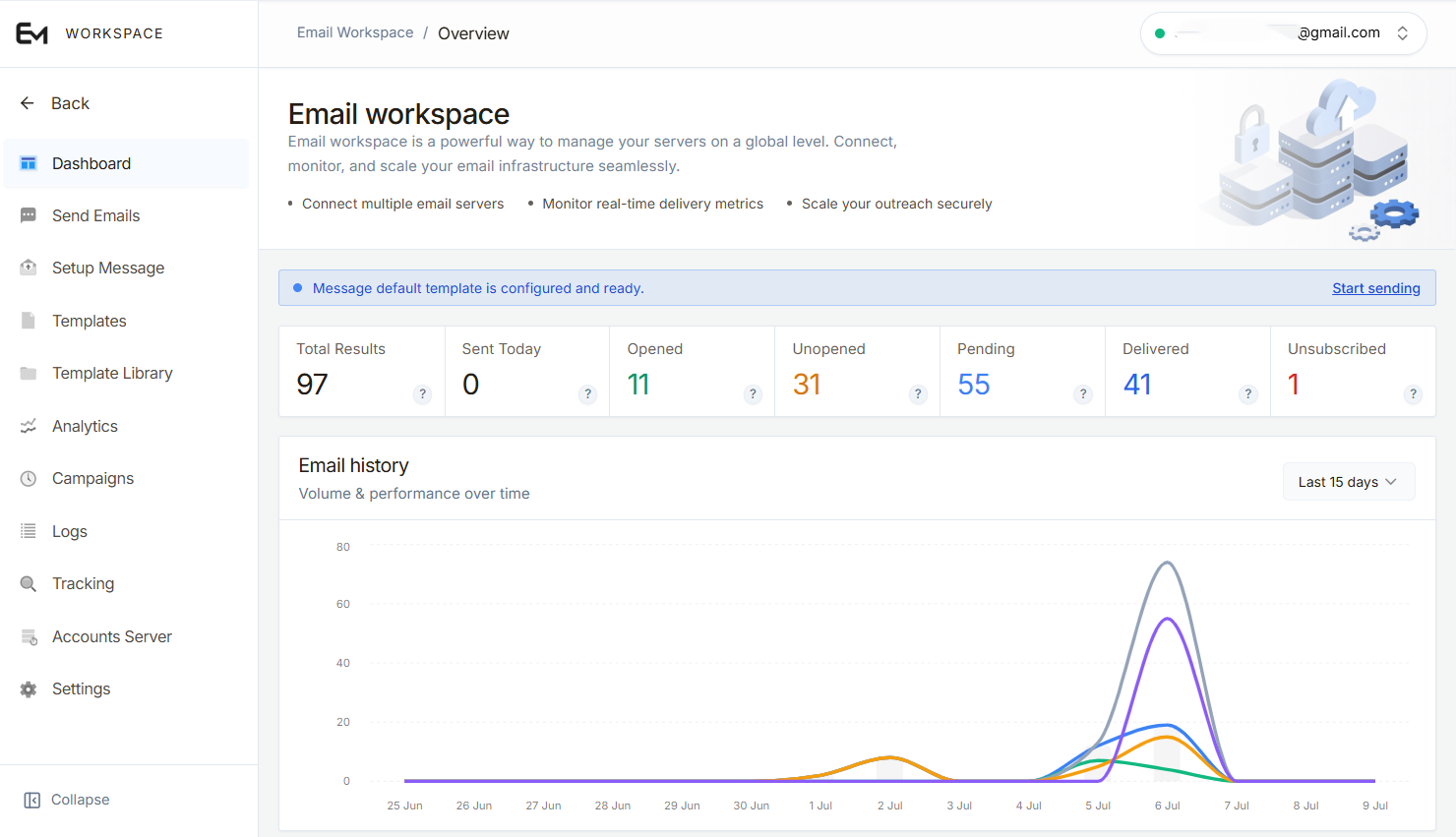
Send cold email from your own workspace
A dedicated email workspace
Each workspace keeps your campaigns separate. On the Pro plan you can send up to 500 emails a day and 15,000 a month; higher plans add more workspaces and volume.
Your own SMTP accounts
Connect your SMTP accounts and manage several sending profiles, so mail goes out from addresses you control.
Templates, spam checker and tracking
Write with templates, run the built-in spam checker before you send, and track opens, unsubscribes and replies from the same screen.
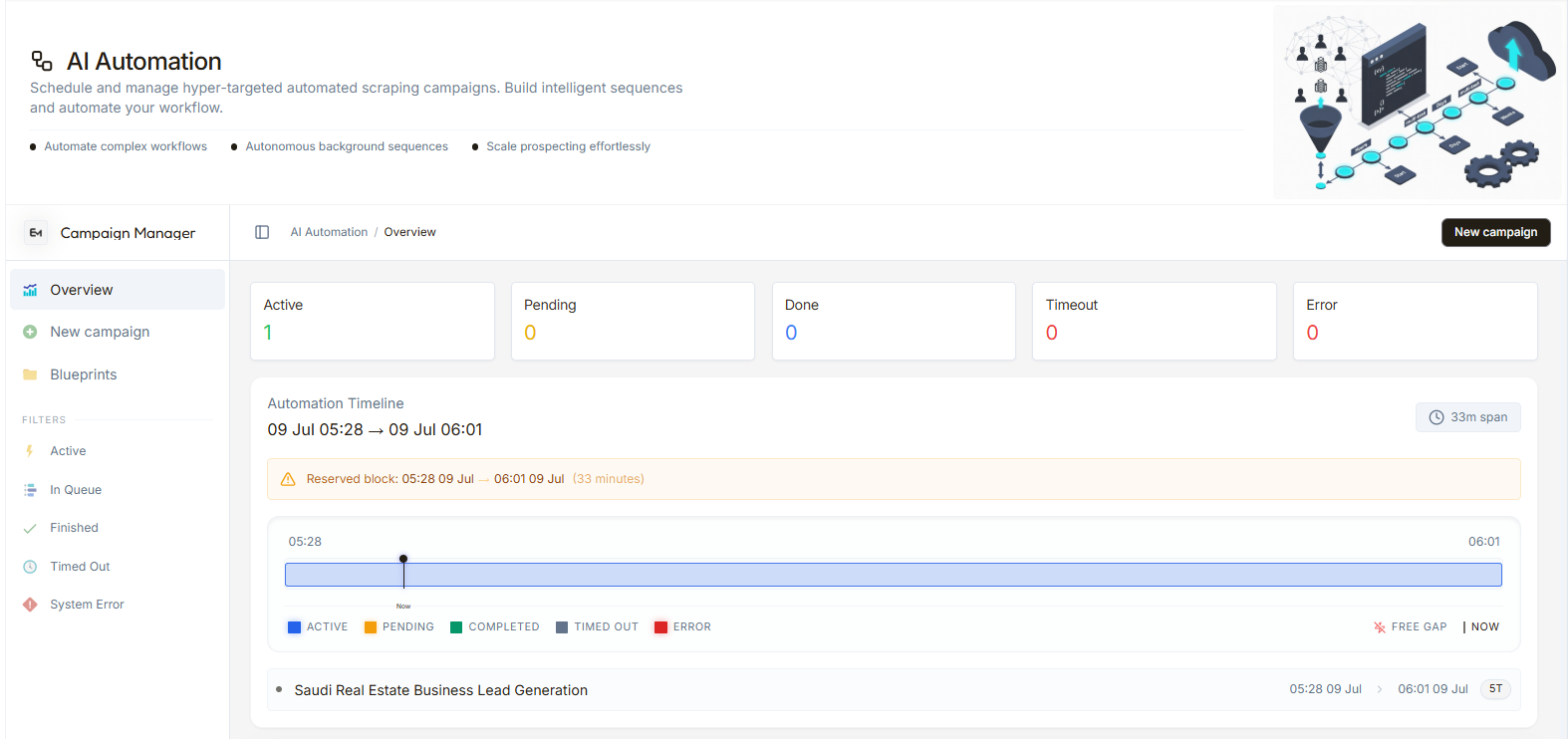
Put lead generation on autopilot
Automations that keep running
Set up an automation once and it keeps finding, collecting and organizing new leads in the background while you work on something else.
Describe it, get a plan
Type what you are looking for, for example "Find real estate agents in New York", and the AI builds a ready-to-use automation you can review and start.
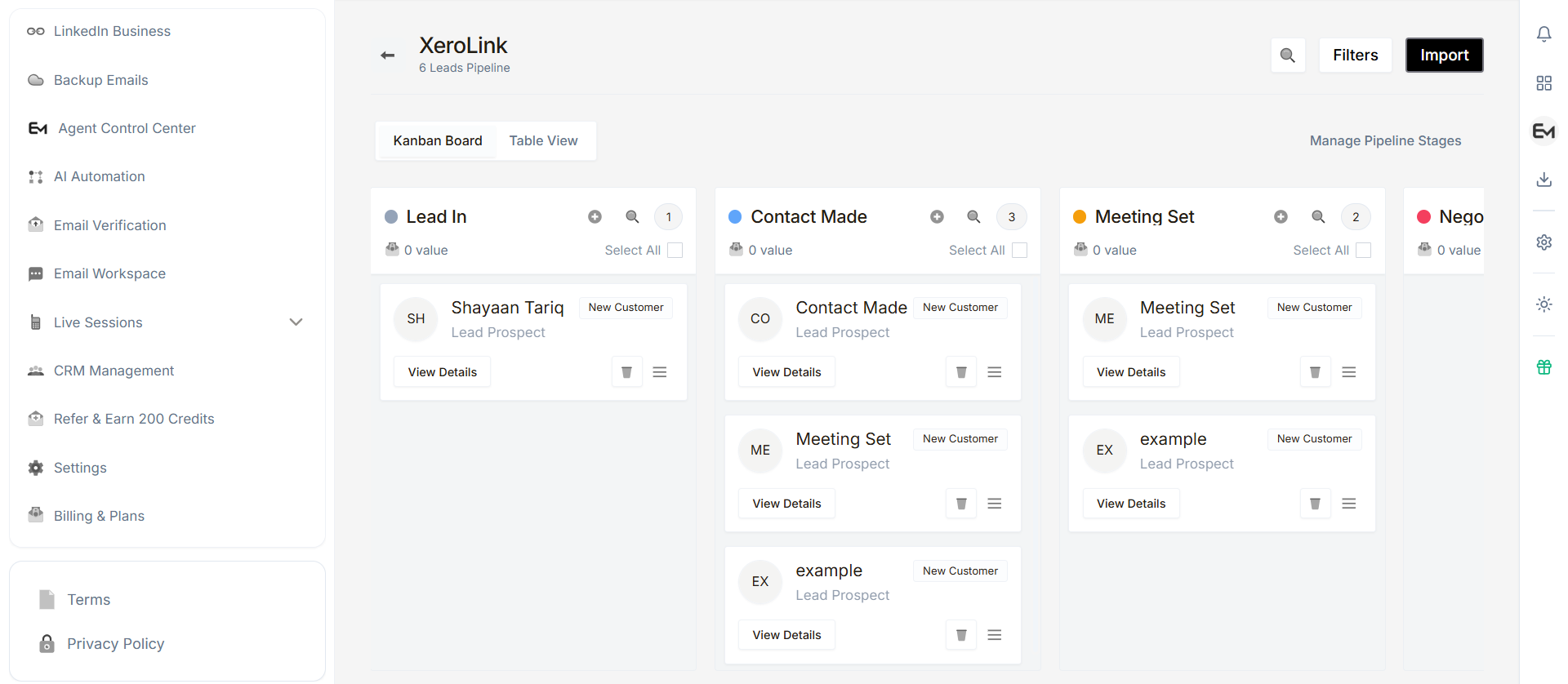
Manage your leads in a built-in CRM
Create a workspace, set up your pipeline and move leads through it as conversations progress.
Workspace tools
Filters, lead import, kanban board, table view and editable pipeline stages.
Default pipeline stages
Email verification API
Verify addresses from your own app. Send a batch, get a job id, read the results.
- Base address
- https://verify-api.emailmarketing.pk
- Send emails
- POST /api/v1/verify
- Read results
- GET /api/v1/verify?job_id=…
- Sign in
- Authorization: Bearer YOUR_API_KEY
- Per request
- Up to 500 new emails
- Time
- Seconds for most. A busy mail server can take up to about 20 minutes
- Reading
- Ask every 3 seconds until job_status is "completed"
- Repeats
- An email you already checked is skipped, free, and keeps its old result
What happens to each email
- 1Format and typo. Instant. Typo domains such as gmial.com are invalid, with a suggestion.
- 2Throwaway domain. Instant. Disposable inbox services are marked disposable.
- 3Mail servers (DNS). Does the domain receive mail? A DNS error is retried, never called invalid.
- 4Catch-all test. A made-up address is asked. If it is accepted, the domain accepts everything.
- 5Mailbox test. The real address is asked. "Try later" answers are repeated after 1, 5 and 15 minutes.
Node.js: 1. Send emails in
const API_KEY = process.env.VERIFY_API_KEY; // keep the key on the serverconst res = await fetch("https://verify-api.emailmarketing.pk/api/v1/verify", {method: "POST",headers: {Authorization: `Bearer ${API_KEY}`,"Content-Type": "application/json",},body: JSON.stringify({ emails: ["john@example.com", "jane@company.com"] }),});const { job_id } = await res.json();console.log("Job:", job_id);
Node.js: 2. Read the results
let data;do {await new Promise((r) => setTimeout(r, 3000));const res = await fetch(`https://verify-api.emailmarketing.pk/api/v1/verify?job_id=${job_id}`, {headers: { Authorization: `Bearer ${API_KEY}` },});data = await res.json();} while (data.job_status !== "completed");console.log(data.results);
Python: 1. Send emails in
import os, requestsAPI_KEY = os.environ["VERIFY_API_KEY"] # keep the key out of your codeBASE = "https://verify-api.emailmarketing.pk"headers = {"Authorization": f"Bearer {API_KEY}"}res = requests.post(f"{BASE}/api/v1/verify", headers=headers,json={"emails": ["john@example.com", "jane@company.com"]})job_id = res.json()["job_id"]print("Job:", job_id)
Python: 2. Read the results
import timewhile True:time.sleep(3)data = requests.get(f"{BASE}/api/v1/verify", headers=headers,params={"job_id": job_id}).json()if data["job_status"] == "completed":breakfor r in data["results"]:print(r["email"], r["status"])
TypeScript: 1. Send emails in
const API_KEY = process.env.VERIFY_API_KEY!; // keep the key on the serverconst BASE = "https://verify-api.emailmarketing.pk";type Job = { success: boolean; job_id: string };const res = await fetch(`${BASE}/api/v1/verify`, {method: "POST",headers: { Authorization: `Bearer ${API_KEY}`, "Content-Type": "application/json" },body: JSON.stringify({ emails: ["john@example.com", "jane@company.com"] }),});const { job_id } = (await res.json()) as Job;
TypeScript: 2. Read the results
type Status = "valid" | "invalid" | "catchall" | "disposable" | "unknown" | "pending";type Poll = {job_status: "pending" | "processing" | "completed";progress: { total: number; completed: number };results: { email: string; status: Status; reason: string | null }[];};let data: Poll;do {await new Promise((r) => setTimeout(r, 3000));const res = await fetch(`${BASE}/api/v1/verify?job_id=${job_id}`, {headers: { Authorization: `Bearer ${API_KEY}` },});data = (await res.json()) as Poll;} while (data.job_status !== "completed");
Replace YOUR_API_KEY with your own key from the dashboard (Email Verification, API and logs).
| status | Meaning |
|---|---|
| valid | The mailbox exists. Safe to send. |
| invalid | The mailbox or domain does not exist. Do not send. |
| catchall | The domain accepts every address. Cannot be confirmed. |
| disposable | A throwaway email service. Remove it. |
| unknown | No clear answer after all tries. Not a confirmed bounce. |
| pending | Still being checked. Ask again. |
Treat unknown and catchall as "not sure": never valid, never invalid. Each result also has a reason and the flags role_account and free_provider.
| Code | Meaning |
|---|---|
| 400 | Bad request, or more than 500 emails. |
| 401 | API key missing or wrong. |
| 402 | Plan ended or no API access. |
| 403 | API access switched off for the server. |
| 404 | Wrong job_id, or it belongs to another server. |
| 429 | Plan limit used up (the answer says when it resets), or too many requests. |
| 500 | Try again later. |
| Per plan | Free | Pro | Business | Strategist |
|---|---|---|---|---|
| Price for 30 days | Free | $25 | $99 | $200 |
| API access | No | Yes | Yes | Yes |
| Emails per day | 50 | 500 | 1,500 | 3,000 |
| Emails per 30 days | 300 | 10,000 | 30,000 | 60,000 |
| Emails per request | No API access | 500 | 500 | 500 |
| Requests per minute | No API access | 60 send, 120 read | 60 send, 120 read | 60 send, 120 read |
| API keys | No API access | 3 | 3 | 3 |
One payment buys 30 days. The limits are shared by the dashboard and every API key. The daily count starts again at 00:00 UTC. When a limit is used up the API answers 429 and says when it resets. You are never billed above your plan.
Common questions
Plain answers about the extension, email verification, sending and your plan.
Still have a question?
Contact supportYou install the E Marketing AI extension in Chrome and sign in. When you search on Google, the extension opens the business websites in the results, reads the public contact details on each page, such as email addresses, and saves them to your account.
It skips social media and online marketplaces, hosting companies and domain registrars, code and developer sites, and banks and fintech sites. This keeps your list focused on real businesses you can contact.
Google research finds businesses from search results and collects the contact details on their websites. LinkedIn research finds companies and people by role. LinkedIn research is included in the paid plans.
For each address, we check that it is written correctly, that its domain can receive mail, and we ask the mail server whether the mailbox exists. No email is sent. Each address is marked Valid, Invalid, Catch-all (the server accepts any address), Disposable (a throwaway address), Timeout or Unknown.
You connect your own SMTP email account to a workspace, and campaigns go out from that account. Your SMTP password is stored encrypted. Each workspace has a daily limit, counted over the last 24 hours, and a 30-day limit.
We add a tiny invisible image to your email. When the email is opened, the image loads and we record the open. Some email apps block images, so the open count can be lower than the real number. Every email can also include an unsubscribe link.
They appear in Collected Leads in your dashboard. You can filter them, export them as Excel, CSV, PDF, JSON, XML, TSV or phone contacts (.vcf), verify them, or send them to the CRM or an email workspace. With Auto Backup on, they are also copied to a backup folder you choose.
New accounts get 300 free credits. Paid plans are a one-time card payment through Stripe for 30 days: Pro is $25 with 3,000 credits, Business is $99 with 6,000 credits and Strategist is $200 with 12,000 credits. The pricing page lists the limits for each plan.
Share your referral link. When someone signs up and verifies their email, you both receive 200 credits. You can refer up to 20 people, for a maximum of 4,000 bonus credits.
Everything in one platform
From finding a lead to following up with them, each step lives in the same account.
AI lead research
Google and LinkedIn agents collect business contacts for your target category and location.
Email verification
Check addresses for valid syntax, mail servers and mailbox status before you send.
Email workspace
Send campaigns through your own SMTP accounts with templates and a spam checker.
Open tracking
See opens, unsubscribes and replies for every campaign.
Built-in CRM
Pipelines, kanban board, table view, filters and lead import in one workspace.
AI automation
Describe a goal and let an automation keep collecting leads in the background.
Backup folders
Automatically save collected emails into backup folders so nothing is lost.
Export anywhere
Download leads as Excel, CSV, PDF, JSON, XML, TSV or phone contacts (.vcf).
Refer a friend, earn credits
Invite people you know. When they verify their email, you both get 200 search credits.
Share your link
Send your personal referral link to a friend or colleague.
They sign up
They create an account and verify their email address.
You both get credits
You and your friend each receive 200 search credits.